Your URL is one of the first things both people and search engines notice about a page. Yet many small business owners overlook it completely. If you want to learn how to create SEO friendly URLs, this guide gives you the clear, practical steps to do it right, without the technical headache. Think of this as the URL chapter of your own Search Engine Optimization (SEO) Starter Guide.
By the end, you’ll be able to:
- Spot what makes a URL good or bad for SEO
- Write clean, readable links that rank and earn clicks
- Avoid the common mistakes that quietly hurt your traffic
Let’s get into it.
What Is an SEO Friendly URL?
An SEO friendly URL is a web address that’s easy for people to read and easy for search engines to understand. It’s short, descriptive, and tells you exactly what the page is about before you even click.
Compare these two:
- ❌ yoursite.com/p?id=12345&cat=7
- ✅ yoursite.com/seo-friendly-urls
The second one wins every time. It’s clean, clear, and packed with meaning. That clarity helps Google index your page and helps users trust your link.
Tip: If you can’t tell what a page is about just by reading its URL, it needs work.
Why SEO Friendly URLs Matter
Good URLs do more than look tidy. They quietly improve your rankings, clicks, and user experience.
Here’s why they’re worth your attention:
- Search engines read them. A descriptive URL gives Google extra context about your content.
- Users trust them. Clean links feel safer and more professional in search results.
- They earn more clicks. A readable URL often boosts your click-through rate.
- They’re easier to share. Short, clear links look better in emails, texts, and social posts.
For small businesses competing on a budget, these small wins add up fast.
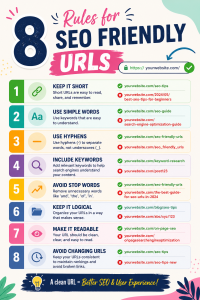
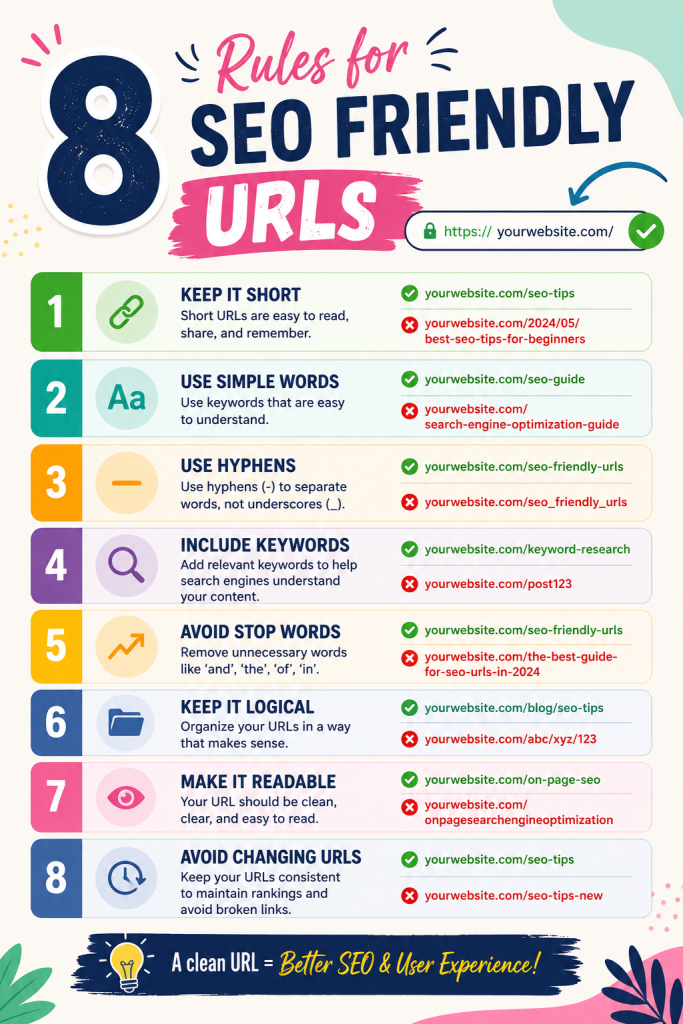
How to Create SEO Friendly URLs: 8 Practical Rules
Ready for the hands-on part? Follow these rules and your URLs will be clean, search-ready, and easy to manage.
1) Keep Them Short and Simple
Shorter URLs are easier to read, remember, and share. Aim for the fewest words that still describe the page.
- ❌ yoursite.com/our-complete-and-detailed-guide-to-creating-urls
- ✅ yoursite.com/url-guide
2) Use Your Target Keyword
Include the main keyword for that page in the URL. It reinforces relevance for both readers and search engines.
Example: A blog post about coffee brewing tips could live at yoursite.com/coffee-brewing-tips.
3) Separate Words With Hyphens
Always use hyphens (-) to split words, never underscores (_) or spaces. Google reads hyphens as spaces between words.
- ❌ yoursite.com/seo_friendly_urls
- ✅ yoursite.com/seo-friendly-urls
4) Stick to Lowercase Letters
Some servers treat uppercase and lowercase letters as different pages. That can create duplicate content issues. Keep everything lowercase to stay safe.
5) Skip Stop Words When Possible
Words like “and,” “the,” “of,” and “a” often add little value. Trim them when the URL still makes sense.
- ❌ yoursite.com/the-best-tips-for-writing-urls
- ✅ yoursite.com/url-writing-tips
6) Avoid Numbers, Dates, and Random Characters
Dates and ID numbers make content feel stale and are hard to update. Leave them out unless they’re truly necessary.
- ❌ yoursite.com/2021/05/blog-post-4471
- ✅ yoursite.com/seo-tips
7) Match the URL to the Content
Your URL should reflect what’s actually on the page. Misleading links frustrate users and raise your bounce rate.
8) Use a Logical Folder Structure
Group related pages under clear categories. This helps users and search engines understand how your site is organized.
Example: yoursite.com/services/web-design shows a clear path from your services section to a specific offering.
Good vs. Bad URLs: A Quick Comparison
Here’s a side-by-side look to make the difference obvious.
| Feature | Bad URL | SEO Friendly URL |
| Readability | ?id=998&ref=44 | /spring-sale |
| Keywords | None | Clear and relevant |
| Length | Long and messy | Short and tidy |
| Separators | Underscores or spaces | Hyphens |
| Case | MixedCase | lowercase |
The pattern is simple: clean, descriptive, and intentional always beats cluttered and random.
How to Change a URL Without Hurting SEO
What if your existing URLs are messy? You can fix them, but do it carefully. Changing a URL without a plan can break links and tank your rankings.
Follow these steps:
- Audit your current URLs. List pages with weak or confusing links.
- Update the URL to a clean, keyword-friendly version.
- Set up a 301 redirect from the old URL to the new one. This passes the old page’s authority forward.
- Update internal links that point to the old version.
- Resubmit your sitemap in Google Search Console.
Watch out for: skipping the 301 redirect. Without it, you risk broken links and lost traffic.
Common URL Mistakes to Avoid
Even small slips can hurt your SEO. Steer clear of these:
- Keyword stuffing: Repeating words like yoursite.com/seo-seo-tips-seo looks spammy.
- Dynamic parameters everywhere: Long strings of symbols confuse users and crawlers.
- Changing URLs without redirects: This breaks links and loses ranking power.
- Overly deep folders: yoursite.com/a/b/c/d/page buries your content too far.
- Ignoring mobile readability: Long URLs look messy on smaller screens.
Mini-summary: Keep links short, descriptive, and stable, and always redirect when you change them.
Conclusion: Build Cleaner Links Starting Today
Learning how to create SEO friendly URLs is one of the easiest wins in your entire SEO toolkit. Clean, descriptive links help search engines understand your pages, build trust with users, and earn more clicks, all without writing a single line of code.
Here’s your quick recap:
- Keep URLs short, lowercase, and keyword-focused.
- Use hyphens, skip stop words, and avoid random numbers.
- Match each URL to its content and structure your site logically.
- Always use 301 redirects when you change a link.
Your next step? Pick one important page on your site, review its URL, and clean it up using the rules above. Small changes like this can quietly lift your visibility over time.
FAQ
What makes a URL SEO friendly?
An SEO friendly URL is short, readable, and descriptive. It uses keywords, lowercase letters, and hyphens, while avoiding random numbers and confusing symbols.
Should I include keywords in every URL?
Include your main keyword for each page naturally. Don’t repeat it or stuff extra terms, since that looks spammy and can hurt your rankings.
Do hyphens or underscores work better in URLs?
Hyphens. Google treats hyphens as word separators, while underscores can join words together and cause confusion.
Can I change an old URL without losing SEO?
Yes, as long as you set up a 301 redirect from the old URL to the new one. This passes the page’s authority forward and prevents broken links.
How long should an SEO friendly URL be?
There’s no strict limit, but shorter is better. Aim for a clean URL that describes the page in just a few words.
Ready to Clean Up Your Website’s SEO?
Messy URLs are just one piece of the SEO puzzle, and you don’t have to solve it alone. Whether you want to fix your site structure, improve your rankings, or build a website that’s optimized from the ground up, I can help. Explore my services to see how smart SEO and web design can grow your business, or reach out directly to talk through your goals. Contact me today and let’s build something that ranks.